
Reviewed by: Chief Operations Officer, Product Fulfillment Solutions
Last updated: January 12, 2026
Executive TLDR
If your team is still picking one order at a time, you are leaving a lot of speed and margin on the table.
Cluster picking lets one picker work multiple orders at once, using a cart or totes, so they walk the pick path a single time instead of repeating the same route for every order.
Done well, cluster picking can dramatically increase lines picked per hour, shorten order cycle times, and cut labor cost per order, without turning your warehouse into chaos. Done poorly, it creates more mis picks, confused totes, and support tickets than you bargained for.
This guide explains how cluster picking works, where it shines for ecommerce brands that ship small, light, non fragile products like supplements, vitamins, cosmetics, snacks, and wellness items, and how a central 3PL partner like
Product Fulfillment Solutions and our
Cincinnati, Ohio fulfillment center can run it for you at scale.
By the end, you will know how to:
- Explain cluster picking to your team in simple language
- Decide if cluster picking fits your order profile and SKUs
- Set up a practical cluster picking workflow without overcomplicating things
- Use technology and scanning to keep accuracy high
- Leverage a 3PL that already has the people, systems, and layout to support cluster picking
If you already suspect your picking process is the bottleneck and want to talk through options with a team that lives this every day, you can start here,
Contact Product Fulfillment Solutions.
Table of Contents
- When cluster picking starts to matter
- Story, How Horizon Grove Nutrition unlocked speed with cluster picking
- What is cluster picking in a warehouse
- Cluster picking vs other picking methods
- Benefits and tradeoffs of cluster picking
- When cluster picking is a good fit
- How to set up cluster picking
- Technology that makes cluster picking work
- Why a central Cincinnati 3PL pairs perfectly with cluster picking
- How Product Fulfillment Solutions runs cluster picking
- Cluster picking FAQs
When cluster picking starts to matter
In the early days, single order picking is fine. One picker, one cart, one order at a time. Simple, easy to train, and forgiving.
Cluster picking starts to matter when:
- Your order volume is big enough that pickers are walking the same aisles over and over
- Most orders are small, one to five lines, and they share a lot of the same SKUs
- Your labor cost per order is creeping up even though your product is light and easy to ship
- Cutoff times are tight and your team is sprinting every afternoon just to keep up
At that point, the problem is not your people. It is the fact that your process is wasting steps.
Story, How Horizon Grove Nutrition unlocked speed with cluster picking
Imagine a fictional brand, Horizon Grove Nutrition. They sell daily vitamin packs and small wellness add ons like electrolyte sticks, green drink sachets, and sleep chews.
The “before” picture, orders were growing, walks were too
Horizon Grove’s pickers were busy, but not always productive:
- They picked one order at a time from printed pick lists
- Each picker walked the same high traffic aisles dozens of times per shift
- Rush windows felt frantic as the team tried to clear the queue before carrier cutoff
Accuracy was decent, but the labor cost per order climbed with every new campaign and product launch.
Discovering cluster picking with a 3PL partner
When Horizon Grove moved into a central 3PL environment similar to
Product Fulfillment Solutions’ Cincinnati fulfillment center, the operations team suggested testing cluster picking:
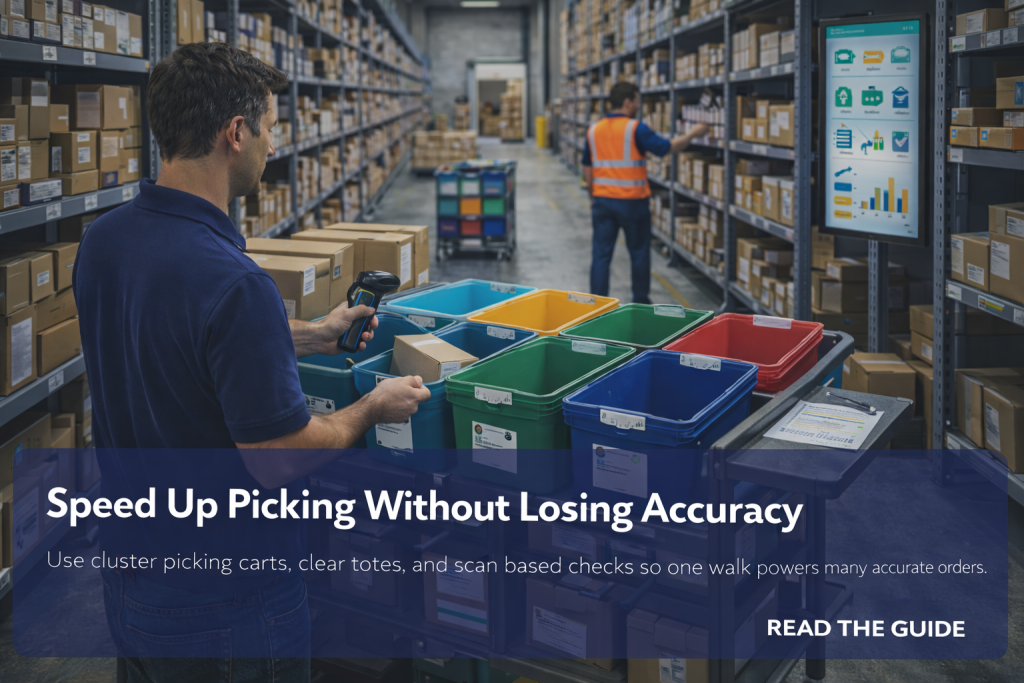
- Pickers ran a cart with six to eight color coded totes, each tote representing a single customer order
- WMS driven pick paths walked each aisle once, dropping items into the right tote as they went
- At the end of the path, each tote was already a complete order, ready for a quick verification and pack
The “after” picture, fewer steps, more orders
Within weeks, Horizon Grove saw results they could feel:
- Lines picked per hour increased without asking pickers to sprint
- Cutoff times were easier to hit, even on busy promo days
- Accuracy stayed high because scanning and clear tote organization caught most potential mistakes
The only real change was this, instead of walking the building 100 times for 100 orders, they walked it 15 or 20 times with carts full of clustered orders.
What is cluster picking in a warehouse
Cluster picking is a picking method where a single picker collects items for multiple orders in one pass through the warehouse.
Instead of picking one order at a time, the picker pushes a cart or uses a rack that holds multiple totes or bins, each assigned to a separate order.
In practice:
- The system groups a set of orders into a cluster
- The picker follows a single optimized route through the pick area
- At each location, they pick the total quantity needed for all orders in that cluster
- They distribute items into the correct tote or bin based on prompts from a pick list, handheld device, or screen
By the time the picker returns to the pack station, each tote represents one complete order, ready for quick verification, packing, and shipping.
Cluster picking vs other picking methods
It helps to see cluster picking in context with other common methods.
Single order picking
One picker, one order, one route through the warehouse. Simple, but often inefficient at scale. Good for very low volume or highly specialized orders.
Batch picking
Pickers collect items for a group of orders but do not separate them by order until later. For example, picking 40 bottles of a supplement that will later be sorted into individual orders at a secondary station.
Zone picking
Pickers are assigned to specific zones. Each picker gathers items only from their zone, and orders are combined or passed between zones before shipping.
Where cluster picking fits
Cluster picking combines pieces of these approaches:
- Like batch picking, it reduces redundant walking
- Like single order picking, each tote remains tied to one customer order
- It works especially well when order profiles are small and many orders share the same SKUs
Benefits and tradeoffs of cluster picking
Cluster picking is powerful, but like any tool, it has tradeoffs.
Benefits of cluster picking
- Higher productivity, more lines picked per hour because pickers walk fewer miles and touch more orders per trip
- Shorter order cycle times, orders move from released to picked faster, which supports tighter cutoff times
- Better use of experienced pickers, your strongest people can handle larger clusters and more complex zones
- Smooth scaling, as volume grows, you add clusters and pickers rather than reinventing the process
Tradeoffs and risks
- More complex to design and train than basic single order picking
- Higher risk of mixing items between orders if totes are not clearly organized
- More reliance on a WMS or strong process discipline to guide pickers
The goal is to get the benefits of speed without paying for it in accuracy problems. That is where design and technology matter.
When cluster picking is a good fit
Cluster picking is not a magic fix for every operation. It tends to work best when:
- Most orders are small, for example one to five lines, rather than very large wholesale pallets
- Your catalog includes many repeatable SKUs that appear in lots of orders
- Your warehouse layout is reasonably compact, especially for fast moving items
- You have or can add basic scanning and WMS support
It is less effective when orders are large and complex, or when items are bulky and difficult to fit into manageable clusters on a cart.
How to set up cluster picking
Here is a simple roadmap for rolling out cluster picking without flipping your entire operation overnight.
Step 1, Identify the right orders to cluster
- Filter for small DTC orders, for example one to five lines, that ship in parcels or mailers
- Exclude complex, bulky, or special handling orders that need more attention
- Start with a subset of SKUs that are easy to pick and visually distinct
Step 2, Choose cluster size and cart design
- Decide how many orders each picker should handle per cluster, for example 4, 6, or 8 orders
- Equip pickers with carts or racks that hold the same number of clearly labeled totes or bins
- Use color coding or prominent labels to reduce the chance of mixing orders
Step 3, Define pick paths and zones
- Group SKUs so that cluster pick routes flow logically through the warehouse
- Keep fast movers in easily accessible locations along common paths
- Limit tight corners and congested aisles that slow down carts
Step 4, Standardize the process
- Create simple SOPs for how to load, pick, and unload cluster carts
- Document how to handle exceptions, substitutions, or missing inventory
- Train a small group first, get feedback, then scale to more team members
Step 5, Add light quality checks
- At pack out, verify that item counts and SKUs match the order before sealing the box
- Spot check clusters from new pickers more frequently at the start
- Track error rates by picker and by cluster size so you can tune the process
Technology that makes cluster picking work
You can technically run cluster picking with paper, but you will feel every limitation. Technology makes it practical and scalable.
WMS support for cluster picking
A capable warehouse management system can:
- Group orders into clusters based on location and SKU overlap
- Generate optimized pick paths for each cluster
- Drive handheld devices that tell pickers which location to visit, how many units to pick, and which tote to place them in
Scanning and digital verification
- Pickers scan locations and items to confirm each pick
- Systems can block the process if the wrong SKU is scanned
- Packers can scan items into the order for a final check before packing
Reporting and continuous improvement
- Track lines picked per hour and per picker
- Monitor error rates by process and cluster size
- Experiment with different cluster sizes and paths, then measure the impact
Why a central Cincinnati 3PL pairs perfectly with cluster picking
Cluster picking focuses on efficiency inside the four walls. Location focuses on efficiency outside them. The best results come when both work together.
From a centrally located facility like
Product Fulfillment Solutions’ Cincinnati, Ohio fulfillment center you can:
- Reach a large share of the United States in one to three business days by ground
- Combine fast internal picking with fast external transit for a strong overall promise
- Keep operations simple by running a single, high efficiency facility instead of many scattered sites
That combination makes it much easier to offer customers realistic, competitive shipping options without burning out your warehouse team.
How Product Fulfillment Solutions runs cluster picking
Product Fulfillment Solutions is a Cincinnati based 3PL focused on ecommerce brands that ship small, light, non fragile products that customers reorder often.
For brands whose order profiles fit cluster picking, we focus on four key areas:
- 1. We start with your reality, not a generic template, order sizes, SKU mix, seasonality, and service level promises
- 2. We design pick paths and cluster rules, around your fast movers and the way your customers actually buy
- 3. We use scan based workflows inside our Cincinnati facility, so cluster picking adds speed without sacrificing accuracy
- 4. We share reporting you can act on, lines per hour, error rates, and service performance across channels
The result is a picking operation that scales with your growth, instead of turning into a daily race against the clock.
Talk to an ExpertCluster picking FAQs
When should we switch from single order to cluster picking
You should consider cluster picking when your team spends more time walking than actually picking, most orders are small, and many orders share the same SKUs. If your daily volume is growing and cutoff times are getting harder to meet, it is a strong sign that a more efficient picking method is due.
How many orders should be in a cluster
There is no single right number, but four to eight orders per cluster is common for small parcel ecommerce. The ideal size depends on your SKUs, aisle layout, and team experience. It is smart to start smaller, measure performance and error rates, then adjust.
Do we need a WMS to use cluster picking
A WMS makes cluster picking far more practical and scalable because it can group orders, guide pick paths, and support scanning. You can experiment on a small scale with paper based clusters, but you will quickly feel the limits if your volume is growing.
Will cluster picking increase mistakes
Cluster picking can increase mistakes if totes are not clearly organized or if there is no scanning and verification. When you use clear labels, simple SOPs, and scan based checks at pick and pack, you can get the speed benefits while keeping or even improving accuracy.
How does Product Fulfillment Solutions support cluster picking
Product Fulfillment Solutions supports cluster picking by combining scan based warehouse technology, smart layout in our Cincinnati facility, and experienced operations teams. We design clusters and pick paths that match your brand’s order profile, then monitor performance so you get the speed benefits without sacrificing accuracy or customer experience.
Talk to an Expert